Proxy Endpoint Formats
This guide explains what proxy endpoints are, the types available in Geonode, and how to choose the most suitable format for your specific use case.
What Is a Proxy Endpoint?
A proxy endpoint is the address used to connect to a proxy server.
It defines how your requests are routed through Geonode’s network, ensuring secure, reliable, and efficient data transmission.
DNS vs. IP-Based Endpoints
Geonode allows users to connect either via a DNS-based hostname or a direct IP address.
1. DNS-Based Endpoints (Recommended)
- Use a domain name such as
proxy.geonode.io. - Easier to maintain, DNS automatically updates IPs when servers change.
- Reduces connection issues caused by IP rotation.
2. IP-Based Endpoints
- Use a direct IP address, e.g.
123.45.67.89:9000. - Skips DNS resolution, which can be slightly faster in some setups.
- Ideal for apps or devices that don’t support DNS hostnames.
Available Endpoint Formats
Geonode supports multiple endpoint formats to ensure compatibility with different systems and authentication methods.
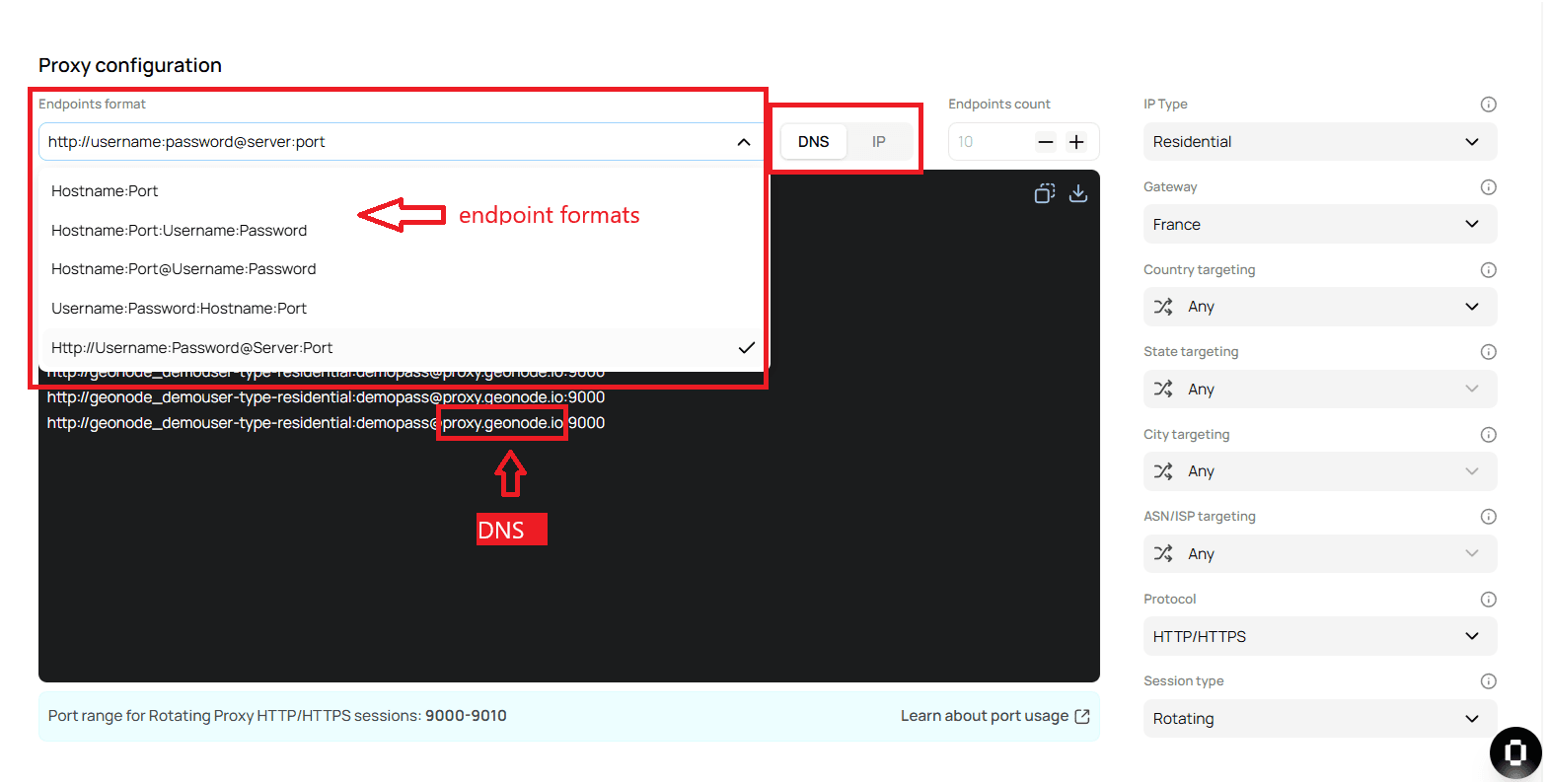
1. hostname:port
- Example:
proxy.geonode.io:9000 - Best for: Simple connections without authentication.
2. hostname:port:username:password
- Example:
proxy.geonode.io:9000:user:pass - Includes authentication credentials for secure access.
- Best for: APIs and applications requiring basic authentication.
3. hostname:port@username:password
- Example:
proxy.geonode.io:9000@user:pass - Alternative authentication format.
- Best for: Legacy or custom proxy clients.
4. username:password@hostname:port
- Example:
user:pass@proxy.geonode.io:9000 - Credentials placed before the host for compatibility.
- Best for: Apps that authenticate before establishing a connection.
5. http://username:password@server:port
- Example:
http://user:pass@proxy.geonode.io:9000 - Explicit HTTP/HTTPS proxy format.
- Best for: Secure browsing and authenticated API requests.
Choosing the Right Proxy Endpoint Format
| Format | Best For |
|---|---|
hostname:port | Standard connections without authentication |
hostname:port:username:password | Secure authentication for APIs & applications |
hostname:port@username:password | Custom or legacy proxy configurations |
username:password@hostname:port | Systems needing pre-authentication |
http://username:password@server:port | Secure browsing, authenticated API access |
Tips and Best Practices
- Start simple: Use
hostname:portif no authentication is required. - Prefer DNS: It’s more reliable and updates automatically.
- Use IP endpoints only for tools that can’t resolve hostnames.
- Always use HTTPS or encrypted channels when handling sensitive credentials.
- Test different formats, some apps accept only specific syntaxes.
Summary
Proxy endpoints define how your connection routes through Geonode’s network.
Choosing the correct format ensures:
- Smooth compatibility with your app or client,
- Secure authentication where required,
- Stable performance with minimal downtime.
Was this page helpful?