Authentication & Base URL
Web DataSet up access to the Geonode Scraper API, generate an API key, and learn how to authenticate requests.
Prerequisites
Before making your first request, complete the following steps.
Create a Geonode Account
Sign up for a Geonode account or log in if you already have one.
Get Access to the Scraper API
Make sure your account has access to the Scraper API.
Generate Your API Key
- Go to the Scraper API Dashboard.
- Click
Get Code. - The
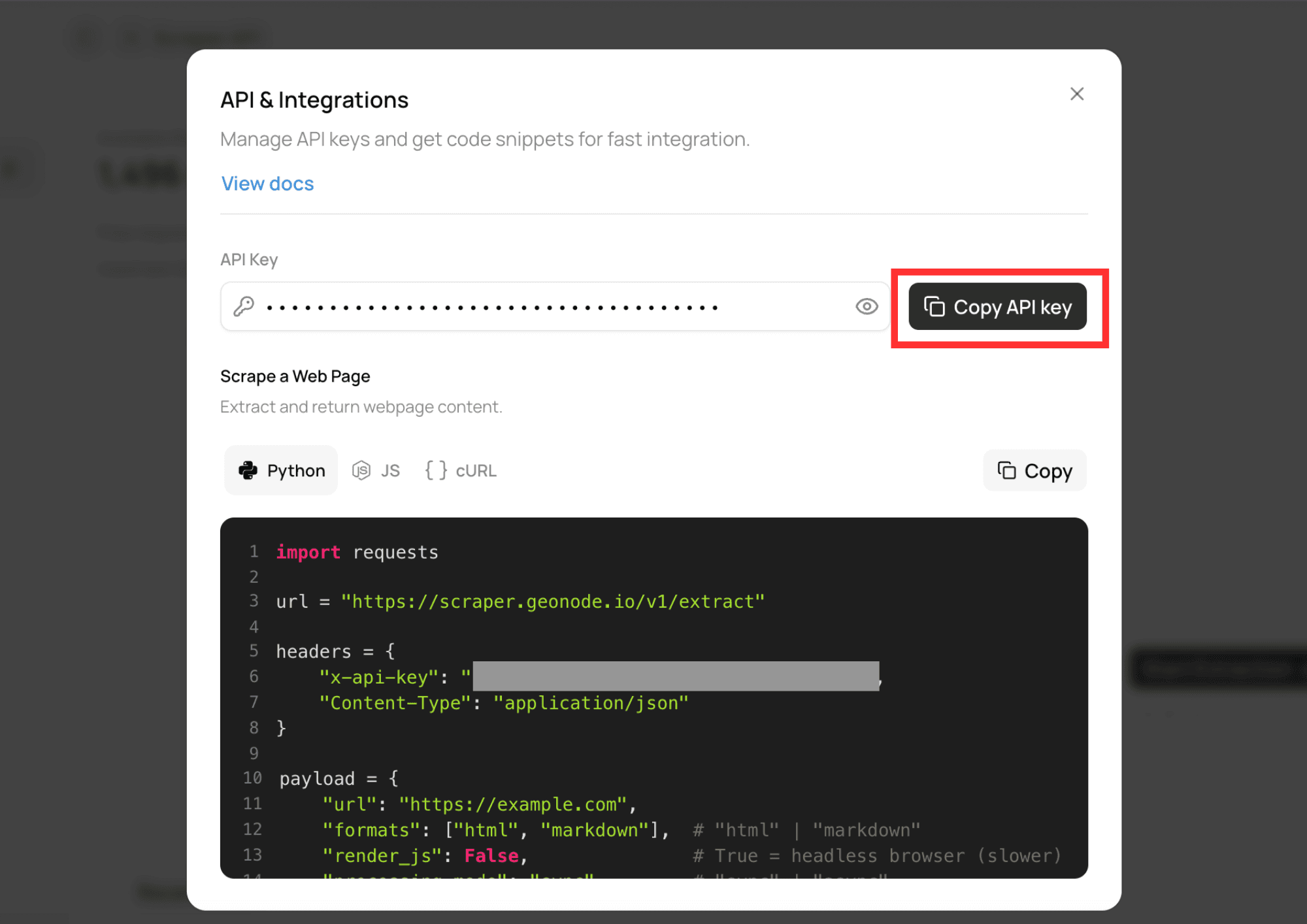
API & Integrationsmodal will open. - Click
Copy API Keyto copy your API key.
Authentication
All Scraper API requests require an API key in the X-Api-Key request header.
X-Api-Key: YOUR_API_KEYexport GEONODE_SCRAPER_API_KEY="YOUR_API_KEY"Replace YOUR_API_KEY with your actual API key. Requests without a valid API key will be rejected.
Keep your API key private. Do not put it in frontend apps, public repos, screenshots, or logs.
Base URL
Use the following base URL for Scraper API requests:
https://scraper.geonode.ioexport SCRAPER_API_BASE_URL="https://scraper.geonode.io"Was this page helpful?