Build a Retail Category Price Catalog from a Public Sitemap
This guide walks you through a real e-commerce workflow with the Geonode Scraper API: as if we are building it together.
You want a competitive catalog snapshot: what a retailer sells in one category, at what price, on promo or not. You already know the website. You do not need Search to find it.
By the end, you will understand which API to reach for at each stage, why Map on a homepage is not the same as the XML sitemap you open in a browser, and why Extract does not paginate for you.
Companion example code lives in geonode-scraper-examples/bedbathandbeyond-catalog/.
Use case
Imagine you are on a category, marketplace, or pricing team. You need a spreadsheet-ready product list with:
- Product title, brand, SKU / item number
- Current price (USD) and sale flag
- Category breadcrumb
- Product URL and retailer product id
Starting point: a known retailer, not a search query. Example: Bed Bath & Beyond.
Sitemap and category used in this walkthrough:
https://www.bedbathandbeyond.com/sitemap.xml
https://www.bedbathandbeyond.com/sitemap/ctaxonomy/ctaxonomy.xml
https://www.bedbathandbeyond.com/c/towels/bath-towels?t=18652
The same pattern works on other public retailers that publish a sitemap index and /c/... category pages (product listing pages, or PLPs). Each SKU lives on a product detail page (PDP), often ending in /product.html.
What we are going to build
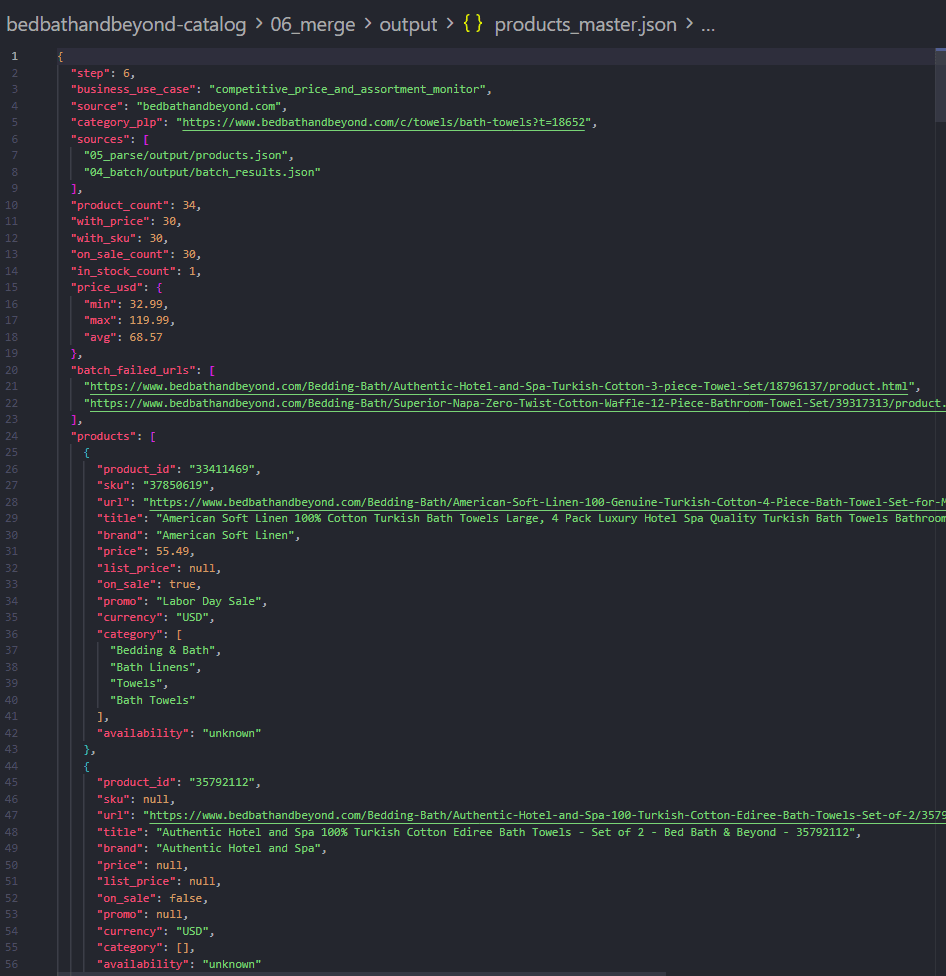
A master JSON catalog file. Each product looks roughly like this (shortened):
{
  "product_id": "33411469",
  "sku": "37850619",
  "url": "https://www.bedbathandbeyond.com/Bedding-Bath/.../33411469/product.html",
  "title": "American Soft Linen 100% Cotton Turkish Bath Towels...",
  "brand": "American Soft Linen",
  "price": 55.49,
  "list_price": null,
  "on_sale": true,
  "promo": "Labor Day Sale",
  "currency": "USD",
  "category": ["Bedding & Bath", "Bath Linens", "Towels", "Bath Towels"],
  "availability": "unknown"
}
In a demo run against two PLP pages of Bath Towels:
| Metric | Approx. result |
|---|---|
| Category PLPs in taxonomy sitemap | ~1,430 |
| Product URLs from 2 listing pages | ~36 |
| PDP HTML files saved | ~34 |
| With a parsed price | ~30 |
| Price range (USD) | ~$33–$120 |
Exact counts depend on pagination depth, Batch failures, and site availability.
The plan (what you should expect)
We move through six stages. At each stage we pick one Geonode product on purpose:
1. Map      → sitemap.xml (index of sub-sitemaps)
2. Map      → ctaxonomy.xml (all category PLP URLs)
3. Extract  → one PLP + pagination → product URLs
4. Batch    → all PDPs → HTML
5. Parse    → title, price, SKU, sale (local)
6. Merge → products_master.json| API | Why we use it here |
|---|---|
| Map | Fast URL inventory from sitemap XML and taxonomy |
| Extract | Render a JS category grid and parse product links; one call = one URL |
| Batch | Many known PDP URLs in one job |
| Local parsing | Turn HTML into price/SKU fields, then merge |
Search is not used. You already know the retailer.
Crawl is not required for this demo. After Extract you already have product URLs. Crawl is the right tool later if you want a BFS walk of one category with a page limit instead of looping ?page=.
Before you start
You need:
- A Geonode API key
- Python 3.9 or later
- The
requestspackage
export GEONODE_SCRAPER_API_KEY="YOUR_API_KEY"
pip install requests
On Windows PowerShell:
$env:GEONODE_SCRAPER_API_KEY="YOUR_API_KEY"
pip install requests
Keep Your API Key Private
Never put your Geonode API key directly in your source code or commit it to your repository. Store it in an environment variable or .env file instead.
Step 1: Map the sitemap index (not the homepage)
What we need
The retailer’s sitemap index: a list of sub-sitemap XML files (taxonomy, refinements, keyword pages, and so on).
What we will do
Open the sitemap in a browser so you know what “success” looks like:
https://www.bedbathandbeyond.com/sitemap.xmlYou should see a <sitemapindex> with <loc> entries such as:
https://www.bedbathandbeyond.com/sitemap/ctaxonomy/ctaxonomy.xml
https://www.bedbathandbeyond.com/sitemap/ctaxonomy/refinements.xml
https://www.bedbathandbeyond.com/sitemap/keyword-search-pages/keyword-search-pages.xml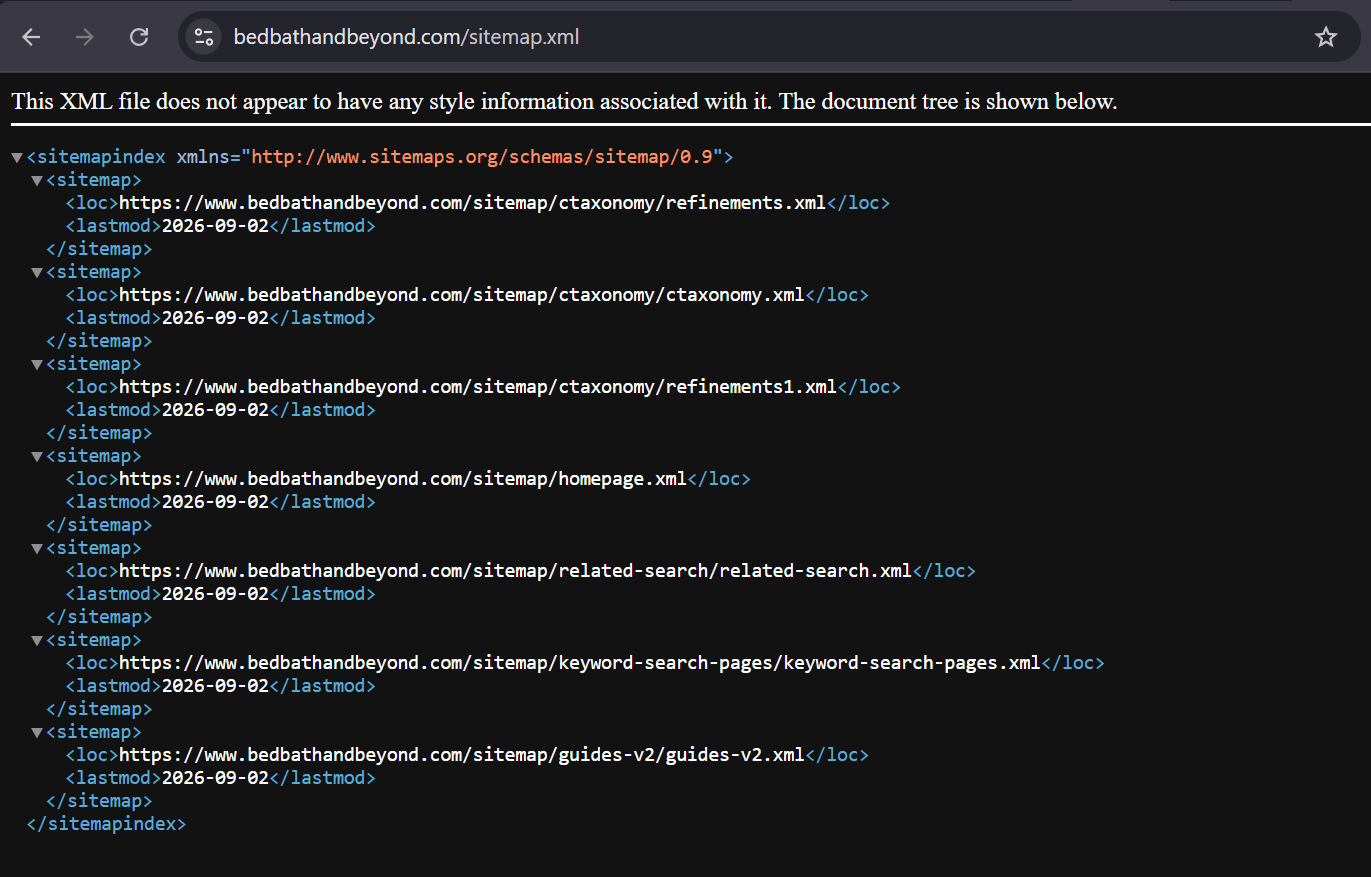
Then call Map on that same URL (sitemap.xml), not on https://www.bedbathandbeyond.com.
Why homepage Map looks different
Map means: discover links from this seed. It is not “pretty-print the XML file Chrome showed you.”
| Seed you Map | Typical result |
|---|---|
Homepage / | Mix of site links, often PDPs (.../product.html) |
sitemap.xml | Inventory of URLs Map can see from that document |
If Map on sitemap.xml does not return the .xml children you see in the browser, Extract the sitemap with render_js: false and parse <loc> tags locally. That is the same lesson as JS directories: Map first, Extract when the document content is what you need.
import os
import requests

api_key = os.environ["GEONODE_SCRAPER_API_KEY"]

response = requests.post(
    "https://scraper.geonode.io/v1/map",
    headers={
        "X-Api-Key": api_key,
        "Content-Type": "application/json",
    },
    json={
        "url": "https://www.bedbathandbeyond.com/sitemap.xml",
        "include_subdomains": True,
    },
)

response.raise_for_status()
print(response.json())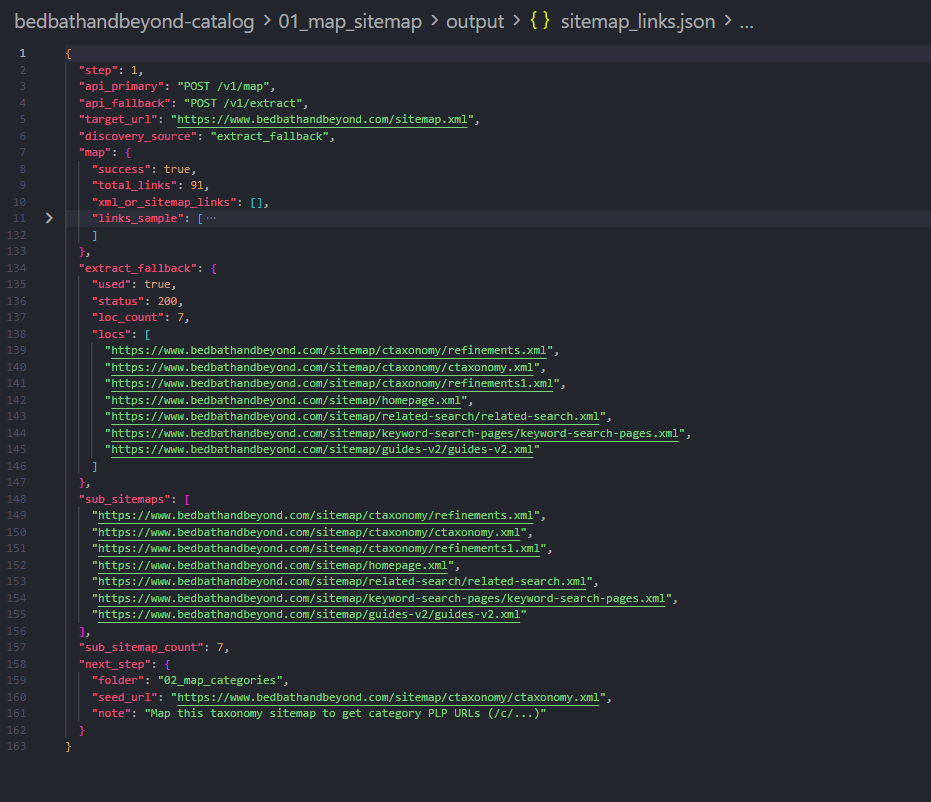
Takeaway
Map answers “what URLs can we inventory from this seed?” For a sitemap index, seed sitemap.xml. Save ctaxonomy.xml as the next seed.
Step 2: Map the category taxonomy (all PLPs)
What we need
Every category listing URL (/c/...) so you can pick one demo category (Bath Towels).
What we will do
Map (or Extract-parse <loc> if Map times out) on:
https://www.bedbathandbeyond.com/sitemap/ctaxonomy/ctaxonomy.xmlIn the browser this file is a <urlset> of category pages, for example:
https://www.bedbathandbeyond.com/c/towels/bath-towels?t=18652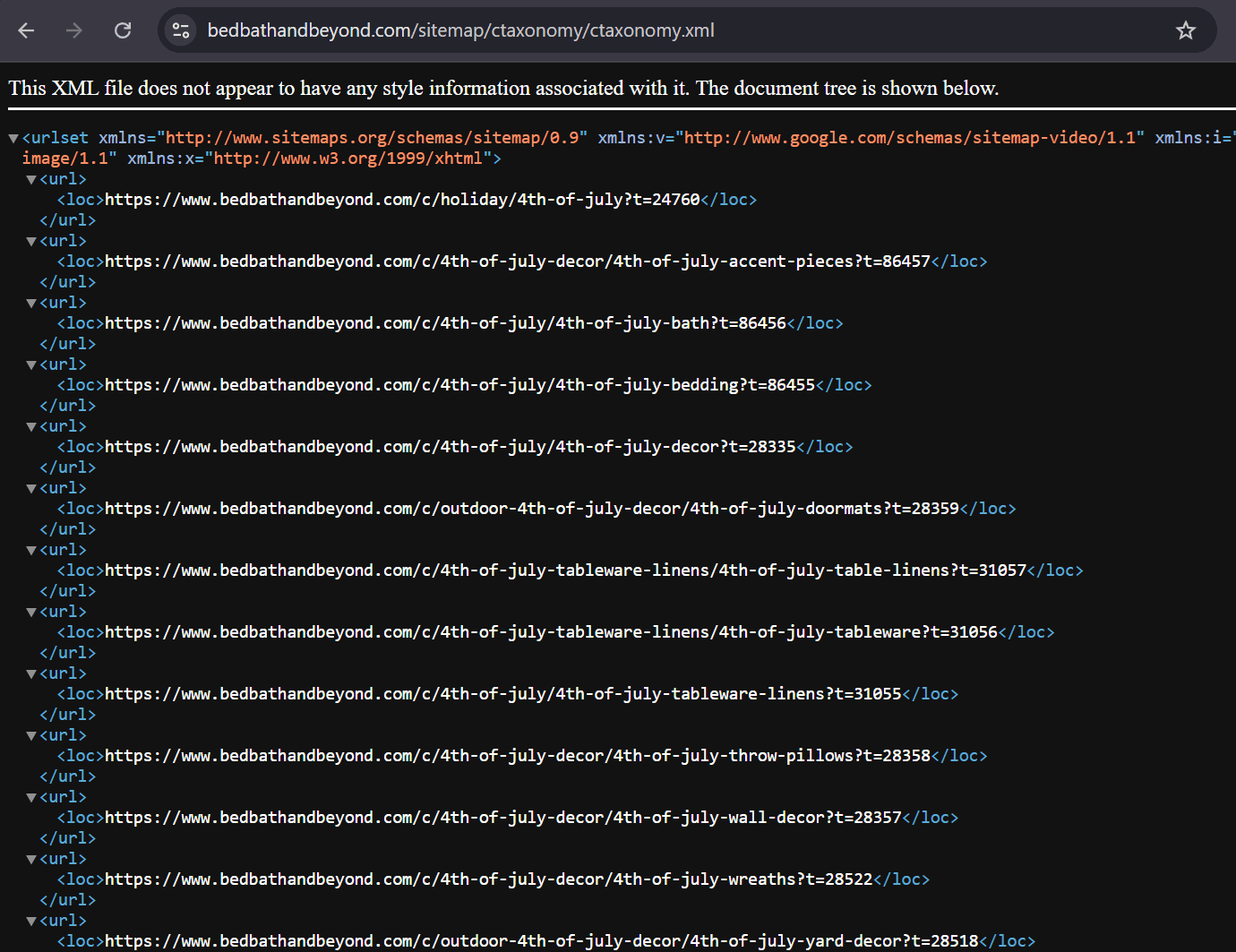
Large XML files
Taxonomy sitemaps can be huge. Map may return HTTP 408 (Map request timed out during URL discovery). That is a documented Map error, not a bad API key. Retry, or Extract the XML and parse every <loc> that contains /c/.
response = requests.post(
    "https://scraper.geonode.io/v1/map",
    headers={
        "X-Api-Key": api_key,
        "Content-Type": "application/json",
    },
    json={
        "url": "https://www.bedbathandbeyond.com/sitemap/ctaxonomy/ctaxonomy.xml",
        "include_subdomains": True,
        "ignore_query_parameters": False,
    },
)

response.raise_for_status()
links = response.json().get("links") or []
# Keep URLs whose path contains /c/
In this example run, taxonomy discovery produced about 1,430 category PLPs. We pick one:
https://www.bedbathandbeyond.com/c/towels/bath-towels?t=18652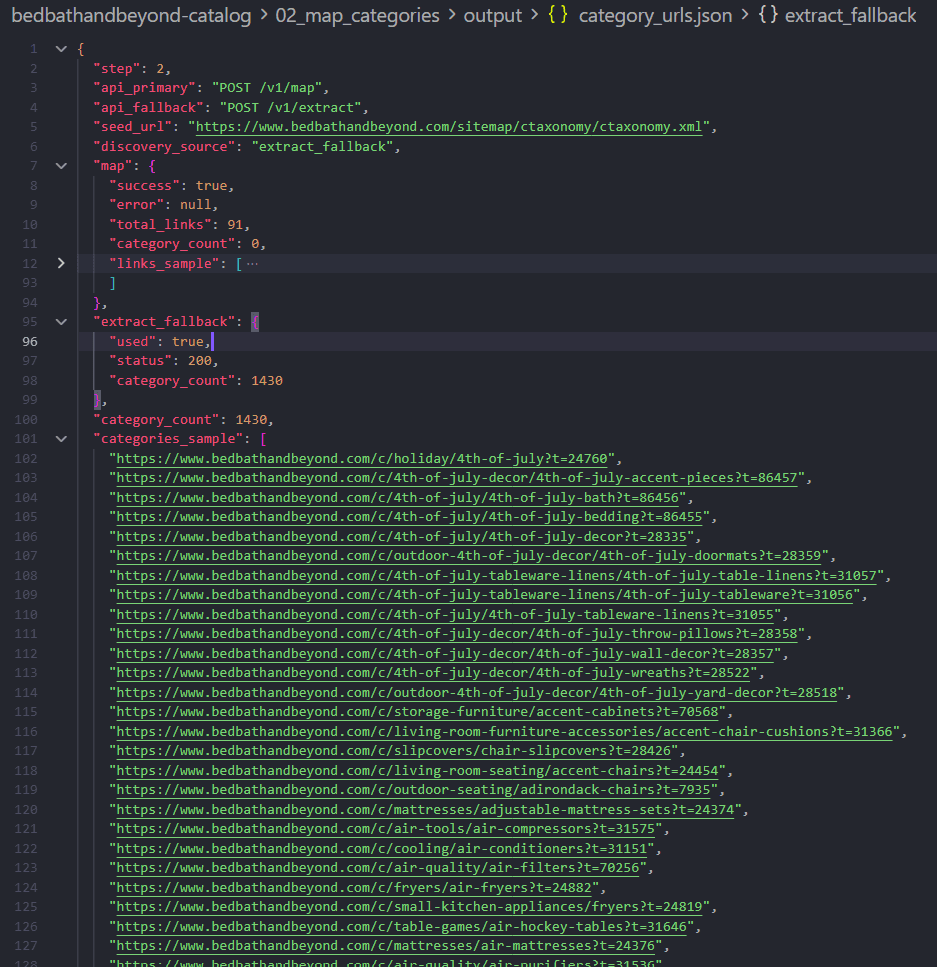
Takeaway
Second Map is the category tree, not product SKUs. PDPs usually live on listing pages, not in this taxonomy file.
Step 3: Extract the category PLP (pagination is your loop)
What we need
Product URLs (.../product.html) from the Bath Towels grid.
What we will do
- Extract page 1 with JavaScript rendering and
wait_config. - Parse the highest
page=in the Markdown (the UI can show the last page on page 1). - Call Extract again for
?page=2,?page=3, … yourself.
Extract does not auto-paginate
One Extract request = one URL. There is no “follow all pages” flag. That is the same pattern as directory listings in the B2B lead list guide.
Bed Bath & Beyond uses a query parameter:
https://www.bedbathandbeyond.com/c/towels/bath-towels?t=18652&page=33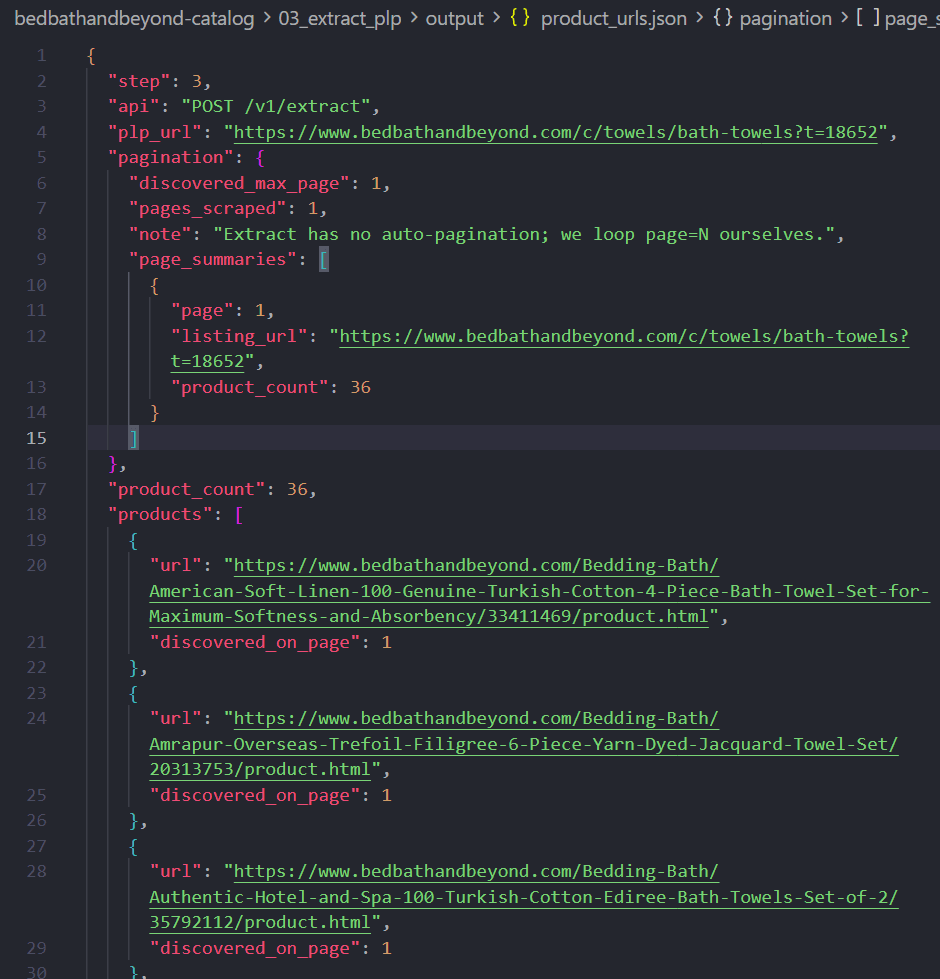
wait_config (when the grid is JS)
From Waiting for Dynamic Content, wait order is:
wait_until → wait_for → wait_timeout → extractFor a product grid:
response = requests.post(
    "https://scraper.geonode.io/v1/extract",
    headers={
        "X-Api-Key": api_key,
        "Content-Type": "application/json",
    },
    json={
        "url": "https://www.bedbathandbeyond.com/c/towels/bath-towels?t=18652",
        "formats": ["markdown"],
        "render_js": True,
        "processing_mode": "sync",
        "proxy": {"country": "US", "type": "residential"},
        "wait_config": {
            "wait_until": "networkidle",
            "wait_for": 'a[href*="product.html"]',
            "wait_timeout": 5000,
        },
    },
)

response.raise_for_status()
markdown = response.json()["data"]["markdown"]
# Parse product.html links; parse max page=N; repeat Extract for page=2...
HTTP 429
429 means request throttled or work concurrency limit reached (Error Handling). Slow down, honor Retry-After if present, and retry with backoff. Sync Extract with render_js uses workers.
This demo extracted 2 PLP pages and collected ~36 product URLs.
Takeaway
Extract discovers PDPs on JS category pages. You implement pagination. Crawl is optional if you prefer one async job with a limit instead of a page loop.
Step 4: Batch extract all product pages
What we need
HTML for every PDP so we can read price, SKU, and title.
What we will do
Submit one Batch job with all known product URLs instead of calling Extract in a loop.
What you should expect
You get a job_id. Poll GET /v1/batch/{job_id} until the job completes. Save each result’s HTML (use the numeric product id in the filename so files are not all named product.html).
Some URLs may fail; keep going. In this run: 36 submitted, 34 HTML files, 2 failed.
product_urls = [
    "https://www.bedbathandbeyond.com/Bedding-Bath/.../33411469/product.html",
    # ... URLs from step 3
]

response = requests.post(
    "https://scraper.geonode.io/v1/batch",
    headers={
        "X-Api-Key": api_key,
        "Content-Type": "application/json",
    },
    json={
        "urls": product_urls,
        "ignore_invalid_urls": True,
        "formats": ["html"],
        "render_js": True,
        "proxy": {"country": "US", "type": "residential"},
        "wait_config": {
            "wait_until": "networkidle",
            "wait_timeout": 3000,
        },
    },
)

response.raise_for_status()
job_id = response.json()["job_id"]
# Poll GET /v1/batch/{job_id} until completed, then save each result HTML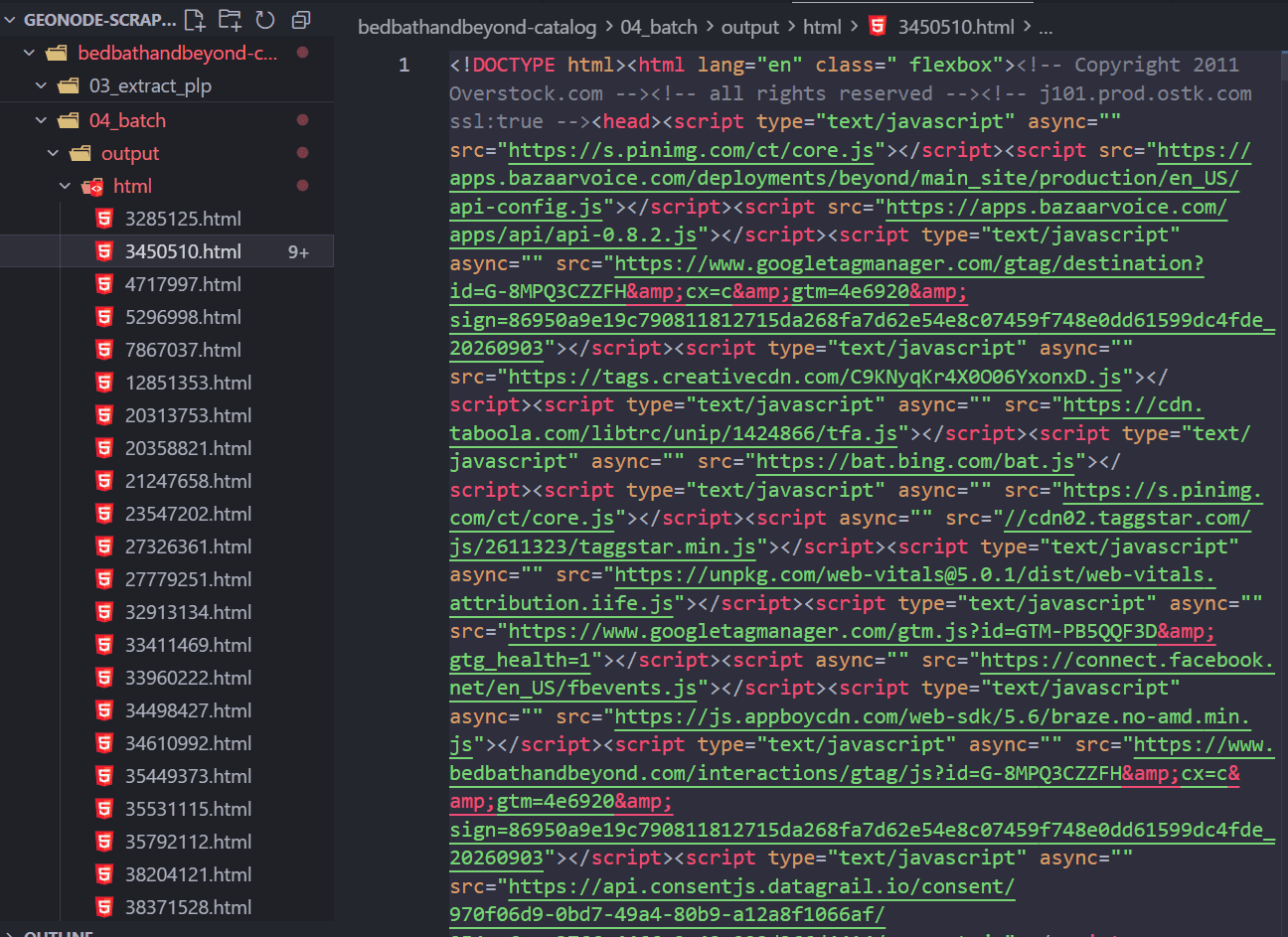
Takeaway
Many known URLs → Batch. Extract was for PLP discovery. Batch is for volume on PDPs you already have.
Step 5: Parse product HTML locally
What we need
Structured product rows: title, price, SKU, sale flag, category.
What we will do
Parse saved HTML locally (no Geonode call). Retailer PDPs often embed a compact analytics object (in this example, ensighten.items with price, sku, productId, productName) plus breadcrumbs.
What you should expect
JSON objects with fields such as:
product_id,sku,url,title,brandprice,list_price,on_sale,currencycategory(breadcrumb)
You may not get a reliable in-stock flag from HTML alone (add-to-cart vs “out of stock” copy is noisy). Treat availability as best-effort.
Takeaway
Scraper API gets you the pages. Local parse makes the pricing spreadsheet. Prefer structured blobs in the HTML over scraping the entire 3,000-line document.
Step 6: Merge the master catalog
What we need
The final deliverable: one slim file a category or pricing person can use.
What we will do
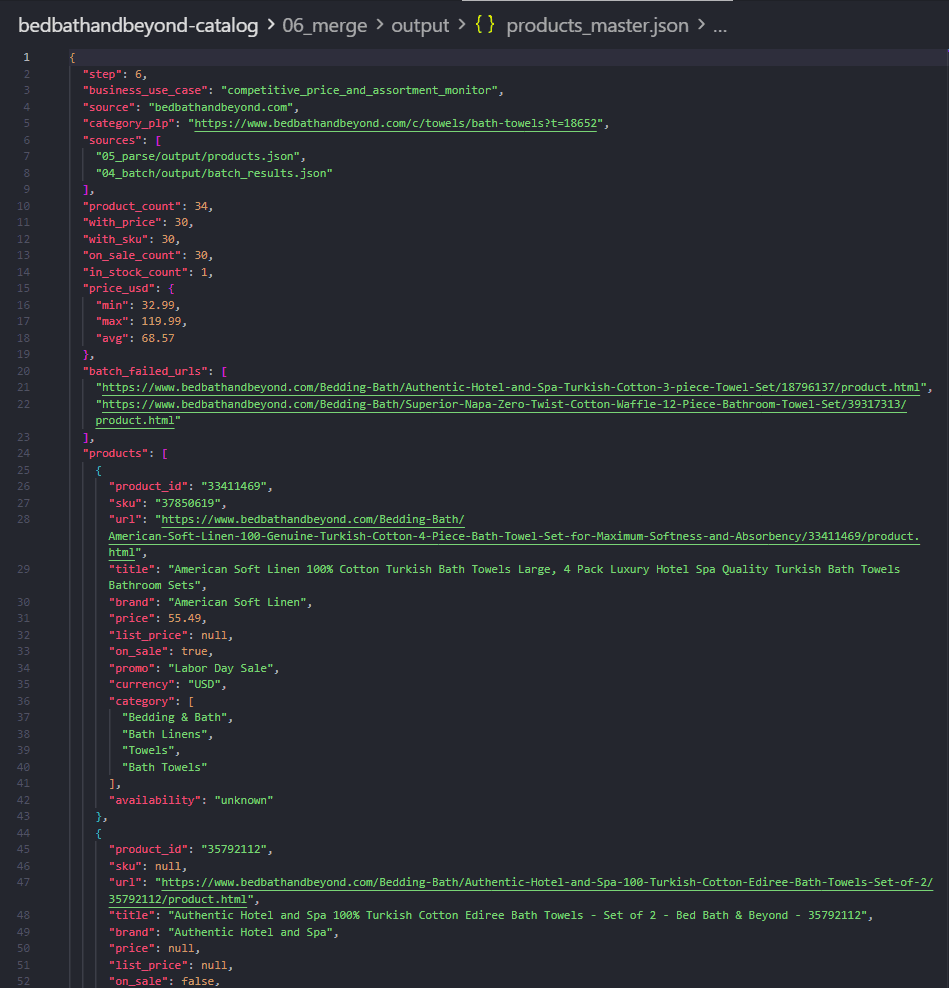
Drop parse internals (source_file). Keep business fields. Add stats (with_price, on_sale_count, min/max/avg USD). Optionally list Batch-failed URLs so you can retry later.
What you should expect
products_master.json with a products array and summary metrics.
Takeaway
Same idea as a B2B master lead file: Geonode fetches pages; your merge step is the business artifact.
Why this API mix worked
You already knew the site (no Search)
Search is for market intent (“Berlin agencies”). Here the seed is a known domain + public sitemap.
Map was the right first tool (unlike the JS directory)
| Situation | Better tool |
|---|---|
| Sitemap index / taxonomy XML | Map (Extract <loc> if Map 408 or misses XML children) |
| JS category grid / pagination | Extract with render_js + wait_config |
| Many known PDP URLs | Batch |
| Deep walk of one site with a page cap | Crawl (optional; not used in this demo) |
Extract + Batch covered listing → SKUs → HTML
- Map builds the category list from taxonomy.
- Extract discovers product URLs from rendered PLPs (+ your page loop).
- Batch pulls all PDP HTML.
- Local code turns HTML into a catalog JSON.
That is usually enough for sitemap → category → products → prices.
When to add Crawl later
Use Crawl from one PLP if you want async BFS with depth and limit instead of writing a ?page= loop. Keep limit small for demos.
Do not Crawl the entire retailer from the homepage for this use case.
Cost and request usage
On request-based plans, successful page extractions consume requests. Map and job-status polling do not count as page extractions the same way content extraction does.
Approximate request shape for a run like this example (2 PLP pages):
| Stage | Rough volume | Notes |
|---|---|---|
| Map sitemap + taxonomy | 2 Map calls | Plus Extract on XML only if Map misses <loc> |
| PLP Extract | 2 pages | page 1–2 with JS rendering (--max-pages 2) |
| PDP Batch | ~36 URLs | 1 request per successfully extracted product |
| Total page extractions | ~38+ | Order-of-magnitude for this demo depth |
If you Extract all Bath Towels pages (for example 30+), listing Extract grows linearly. Batch then grows with unique PDPs.
Cost contrast: Crawl the whole site
A homepage Crawl with a high limit can fetch hundreds of mixed URLs (guides, search pages, PDPs). For one category, Extract that PLP + Batch those PDPs stays bounded.
Pricing and plan details can change: check Scraper API Pricing and the Geonode pricing page.
Unlimited plans bill by concurrency (threads), not a monthly request balance: useful when you run large Batches often.
Limitations and good practice
- Use publicly available pages and respect site terms / robots rules for your jurisdiction and use case.
- Prices and promo flags change; this is a point-in-time snapshot, not a live feed unless you re-run Batch.
availabilityparsed from HTML can be wrong; confirm in the UI if stock is a business-critical field.- Pagination windows in the UI may not show the true last page on page 1; still parse
page=links and cap--max-pagesfor demos. - This guide produces a catalog file, not a commercial scraping product. Apply your own policies.
Recap
- Map
sitemap.xmlto find sub-sitemaps (Extract XML if Map misses<loc>). - Map
ctaxonomy.xmlto list category PLPs (handle Map 408 on huge files). - Extract one PLP with JS +
wait_config; loop?page=yourself. - Batch all PDPs to HTML.
- Local parse + merge produces the master price catalog.
Companion: B2B directories use Search → Map-often-fails → Extract listings. Retailers with a sitemap use Map twice → Extract PLP → Batch PDPs.
Was this page helpful?
Build a B2B Agency Lead List from a Directory
Teaching walkthrough: discover a tech agency directory with Search, learn when Map fails on JS listings, then use Extract and Batch to build an enriched lead list with homepage contacts.
Build a Docs Knowledge Corpus with Crawl
Teaching walkthrough: start from Geonode public docs, use Crawl to discover and extract linked pages, then parse into a Markdown corpus for RAG or help-bot use.