Proxy Service Guide
Proxy Endpoint Formats
This guide explains what proxy endpoints are, the types available in Geonode, and how to choose the most suitable format for your specific use case.
What Is a Proxy Endpoint?
A proxy endpoint is the address used to connect to a proxy server.
It defines how your requests are routed through Geonode’s network, ensuring secure, reliable, and efficient data transmission.
DNS vs. IP-Based Endpoints
Geonode allows users to connect either via a DNS-based hostname or a direct IP address.
1. DNS-Based Endpoints (Recommended)
- Use a domain name such as
proxy.geonode.io. - Easier to maintain — DNS automatically updates IPs when servers change.
- Reduces connection issues caused by IP rotation.
2. IP-Based Endpoints
- Use a direct IP address, e.g.
123.45.67.89:9000. - Skips DNS resolution, which can be slightly faster in some setups.
- Ideal for apps or devices that don’t support DNS hostnames.
Available Endpoint Formats
Geonode supports multiple endpoint formats to ensure compatibility with different systems and authentication methods.
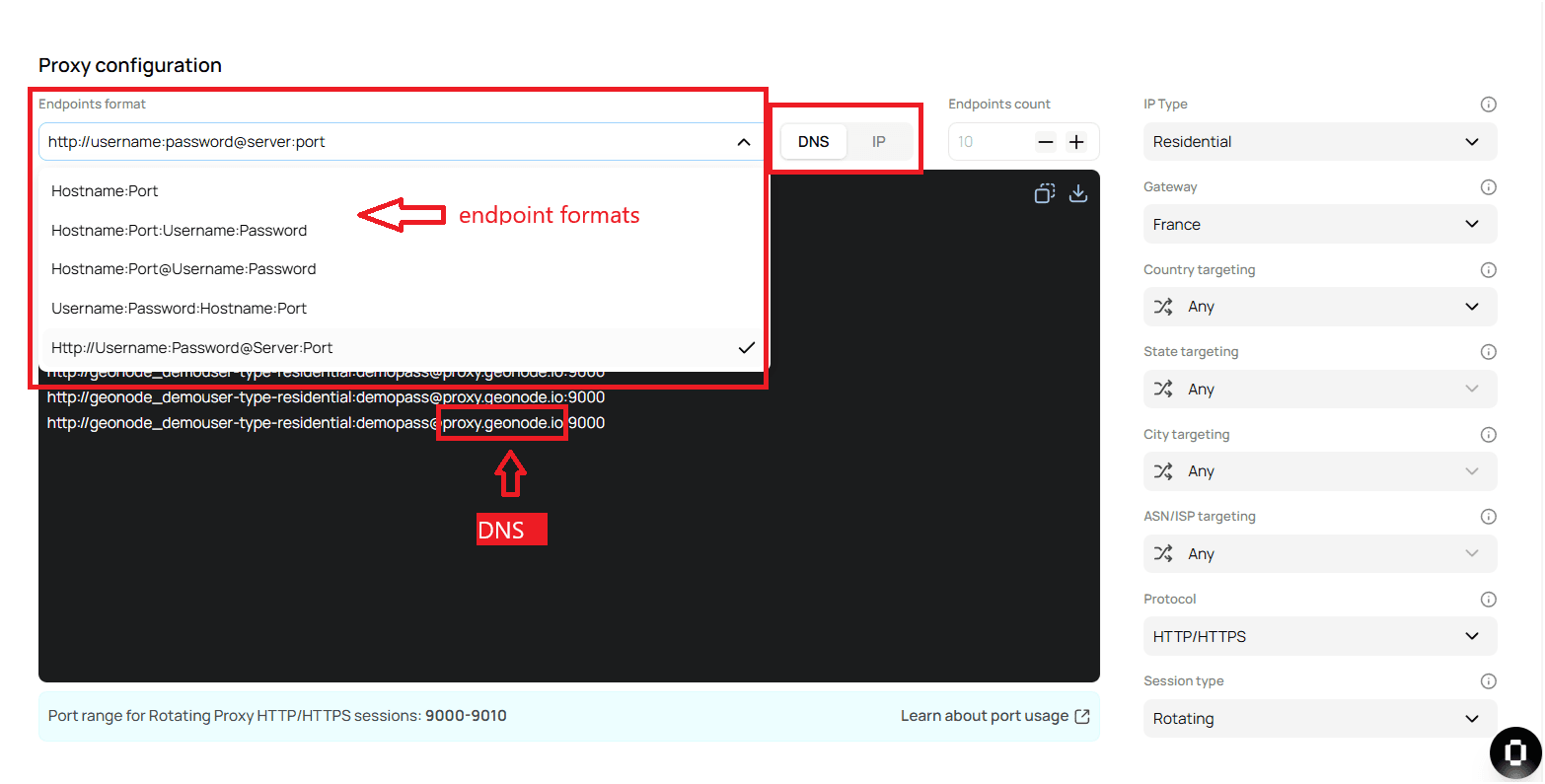
1. hostname:port
- Example:
proxy.geonode.io:9000 - Best for: Simple connections without authentication.
2. hostname:port:username:password
- Example:
proxy.geonode.io:9000:user:pass - Includes authentication credentials for secure access.
- Best for: APIs and applications requiring basic authentication.
3. hostname:port@username:password
- Example:
proxy.geonode.io:9000@user:pass - Alternative authentication format.
- Best for: Legacy or custom proxy clients.
4. username:password@hostname:port
- Example:
user:pass@proxy.geonode.io:9000 - Credentials placed before the host for compatibility.
- Best for: Apps that authenticate before establishing a connection.
5. http://username:password@server:port
- Example:
http://user:pass@proxy.geonode.io:9000 - Explicit HTTP/HTTPS proxy format.
- Best for: Secure browsing and authenticated API requests.
Choosing the Right Proxy Endpoint Format
| Format | Best For |
|---|---|
hostname:port | Standard connections without authentication |
hostname:port:username:password | Secure authentication for APIs & applications |
hostname:port@username:password | Custom or legacy proxy configurations |
username:password@hostname:port | Systems needing pre-authentication |
http://username:password@server:port | Secure browsing, authenticated API access |
Tips and Best Practices
- Start simple: Use
hostname:portif no authentication is required. - Prefer DNS: It’s more reliable and updates automatically.
- Use IP endpoints only for tools that can’t resolve hostnames.
- Always use HTTPS or encrypted channels when handling sensitive credentials.
- Test different formats — some apps accept only specific syntaxes.
Summary
Proxy endpoints define how your connection routes through Geonode’s network.
Choosing the correct format ensures:
- Smooth compatibility with your app or client,
- Secure authentication where required,
- Stable performance with minimal downtime.