Proxy Service Guide
Geo-Targeting
This guide explains what Geo-Targeting is and how Geonode allows you to choose proxies based on country, state, and city for precise connection control and regional flexibility.
What Is Geo-Targeting?
Geo-Targeting lets you filter and select proxy locations by country, state, and city.
It enables businesses, developers, and marketers to access content and services as if they were browsing directly from a specific geographic area.
How Geo-Targeting Works in Geonode
Geonode supports three levels of geo-targeting, shown in the example below:
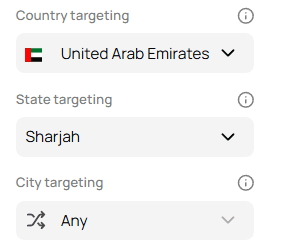
- Country Targeting – Select a country for your proxy connection.
- State Targeting – Choose a particular state or region within that country.
- City Targeting – Narrow it down further by selecting a specific city, or set it to Any for broader access.
Why Use Geo-Targeting?
1. Access Geo-Restricted Content
- Bypass region-based restrictions on websites, apps, and streaming services.
- View local search engine results, prices, and ads as a user from that area.
2. Improve Localized Testing and Marketing
- Run ad verification and A/B tests by region.
- Test localized websites, apps, and payment systems from multiple markets.
3. Ensure Compliance and Security
- Simulate user behavior from different regions for compliance testing.
- Avoid detection by using realistic, location-accurate IPs.
Choosing the Right Geo-Targeting Option
| Geo-Targeting Level | Best For |
|---|---|
| Country Targeting | General browsing, international research, region-based content access |
| State Targeting | Regional services, ad verification, localized e-commerce |
| City Targeting | Precision testing, local SEO, hyper-targeted ad campaigns |
Notes and Recommendations
- The availability of state and city targeting depends on the selected country.
- Some cities may have fewer proxy IPs — use “Any” for better coverage.
- For faster performance, select a location closer to your target audience or testing region.
Best Practices
- Use Country Targeting for broad, region-specific access.
- Choose State or City Targeting for more precise, location-based control.
- Start with Country Targeting and refine your selection as needed for campaigns or tests.
Summary
Geo-Targeting gives you granular control over your proxy location — from country down to city level.
By choosing the right targeting depth, you can:
- Access localized content,
- Run accurate regional tests, and
- Optimize performance for specific markets.