Proxy Endpoints
ProxiesThis guide explains how to generate, configure, copy, and download proxy endpoints for Geonode Residential, Rotating Datacenter, and Unlimited Residential Proxies.
What Is a Proxy Endpoint?
A proxy endpoint contains the connection details your application uses to send requests through Geonode's proxy network.
| Component | Description | Example |
|---|---|---|
| Hostname | Proxy server address | proxy.geonode.io |
| Port | Port used for the proxy connection | 9000 |
| Username | Proxy username with optional configuration parameters | YOUR_USERNAME-type-datacenter |
| Password | Password used to authenticate the connection | YOUR_PASSWORD |
Your endpoint details depend on your proxy product, protocol, and selected configuration.
Generate Proxy Endpoints
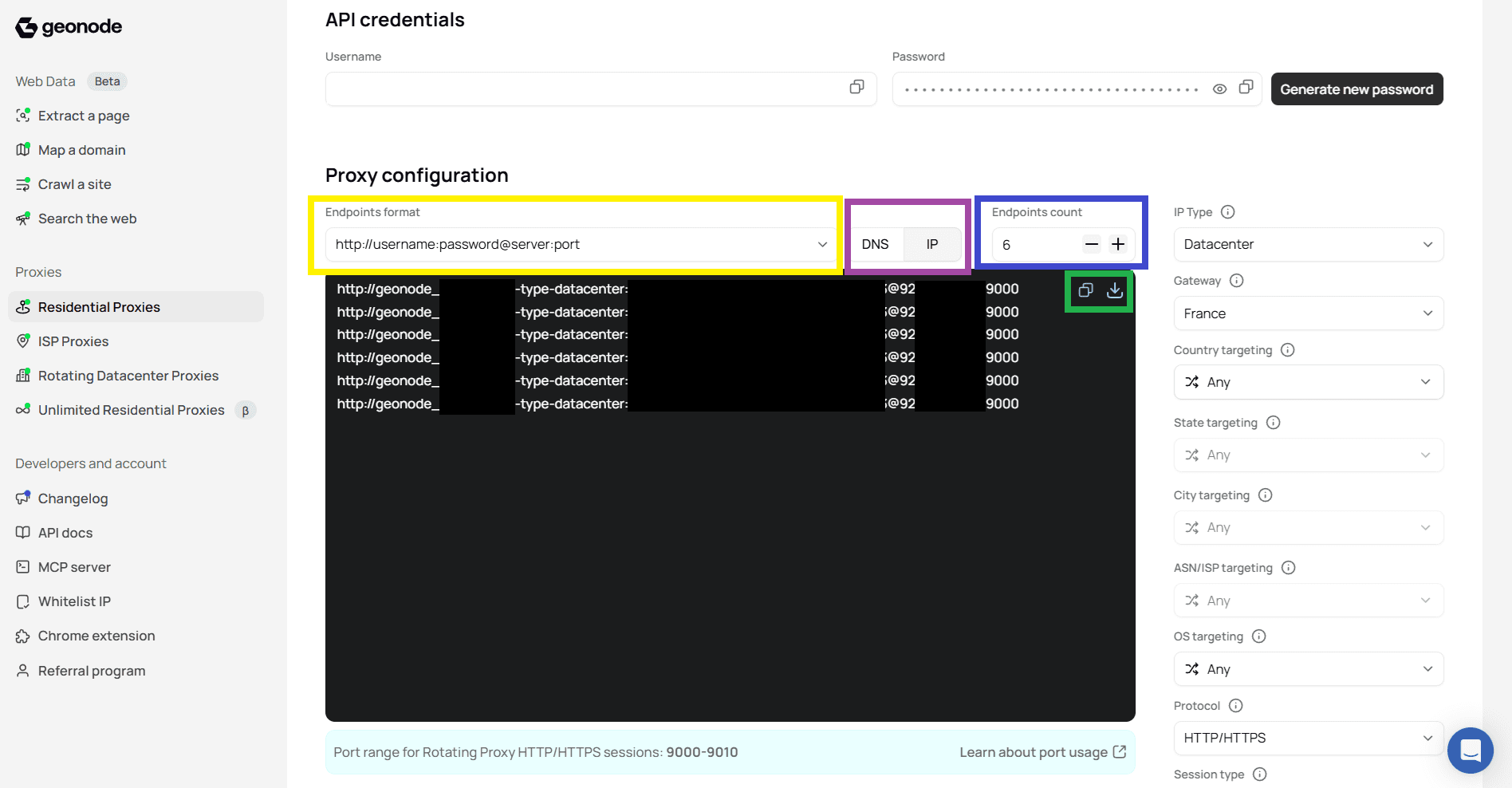
Open Proxy configuration in your dashboard.
Choose an Endpoints format.
Select DNS or IP.
Set the number of endpoints using Endpoints count.
Configure any additional settings available for your proxy product.
Copy or download the generated endpoints.
The generated endpoint list reflects your selected configuration.
Endpoint Formats
Geonode supports five endpoint formats. Choose the one required by your proxy client or application.
| Format | Example |
|---|---|
hostname:port | proxy.geonode.io:9000 |
hostname:port:username:password | proxy.geonode.io:9000:USER:PASS |
hostname:port@username:password | proxy.geonode.io:9000@USER:PASS |
username:password:hostname:port | USER:PASS:proxy.geonode.io:9000 |
http://username:password@server:port | http://USER:PASS@proxy.geonode.io:9000 |
For applications that accept a complete proxy URL, use the http://username:password@server:port format.
Authentication
USER and PASS are placeholders. Replace them with your credentials. The hostname:port format does not include authentication details.
DNS vs IP Endpoints
Choose whether your generated endpoint uses a hostname or a numeric IP address.
| Option | Description | Example |
|---|---|---|
| DNS | Connect using a proxy hostname | proxy.geonode.io:9000 |
| IP | Connect using a numeric proxy server address | 92.204.171.83:9000 |
How to Switch Between DNS and IP
- Find the DNS and IP options next to Endpoints format.
- Select DNS for a hostname-based endpoint or IP for a numeric address.
- Copy the updated endpoint.
DNS endpoints resolve the hostname to a proxy server address. IP endpoints connect directly to the specified address.
Proxy Server IP vs Exit IP
The IP address shown in your endpoint identifies the proxy server, not necessarily the exit IP used to access the destination website.
Endpoint Count
Endpoints count controls how many endpoint entries Geonode generates.
- Find Endpoints count in Proxy configuration.
- Click
+to increase the count or-to decrease it. - Copy or download the generated list.
Multiple Endpoints
Generating multiple endpoints does not guarantee multiple unique exit IPs. Exit IP selection depends on your proxy product, configuration, and session behaviour.
Copy or Download Endpoints
Use the icons above the generated endpoint list to export your connection details.
| Action | Description |
|---|---|
| Copy | Copies the generated endpoints to your clipboard |
| Download | Saves the generated endpoint list to your device |
Use Copy to paste an endpoint into a proxy client or script. Use Download when you need to save or import multiple endpoints.
Endpoint Differences by Proxy Product
Geonode uses different hostnames, ports, and available settings depending on your proxy product.
| Product | Example Hostname | Example Port |
|---|---|---|
| Residential Proxies | proxy.geonode.io | 9000 |
| Rotating Datacenter Proxies | rotating-datacenter.geonode.io | 11000 |
| Unlimited Residential Proxies | residential-unlimited-us-02-proxy.geonode.io | 12000 |
These are examples from the dashboard. Use the connection details generated for your selected product and protocol.
Configuration Differences
| Product | Gateway | Targeting |
|---|---|---|
| Residential Proxies | Selectable | IP type, location, ASN/ISP, and OS options where available |
| Rotating Datacenter Proxies | Predefined | Location, ASN/ISP, and OS options where available |
| Unlimited Residential Proxies | Predefined | Country and OS options shown in the dashboard |
Product-Specific Settings
Some options are predefined or depend on other selections. For example, state and city targeting may become available after selecting a country. A predefined gateway does not prevent endpoint generation.
Frequently Asked Questions
Was this page helpful?