IP Type
ProxiesThis guide explains how to select Residential, Datacenter, or Mix IP types in Geonode Residential Proxies and verify your configuration.
Available IP Types
The IP Type setting lets you choose the type of proxy IP used for your requests.
| IP Type | Description | When to Use |
|---|---|---|
| Residential | IP addresses associated with residential internet connections | When you need residential network IPs |
| Datacenter | IP addresses from Geonode's datacenter category | When your task requires datacenter IPs |
| Mix | Allows both Residential and Datacenter IP types | When either IP type works for your task |
Availability
IP Type selection is available only in the Residential Proxies dashboard. Rotating Datacenter and Unlimited Residential Proxies do not offer this dropdown.
How to Configure IP Type
Find IP Type under Proxy configuration.
Select Residential, Datacenter, or Mix.
Copy the updated proxy endpoint.
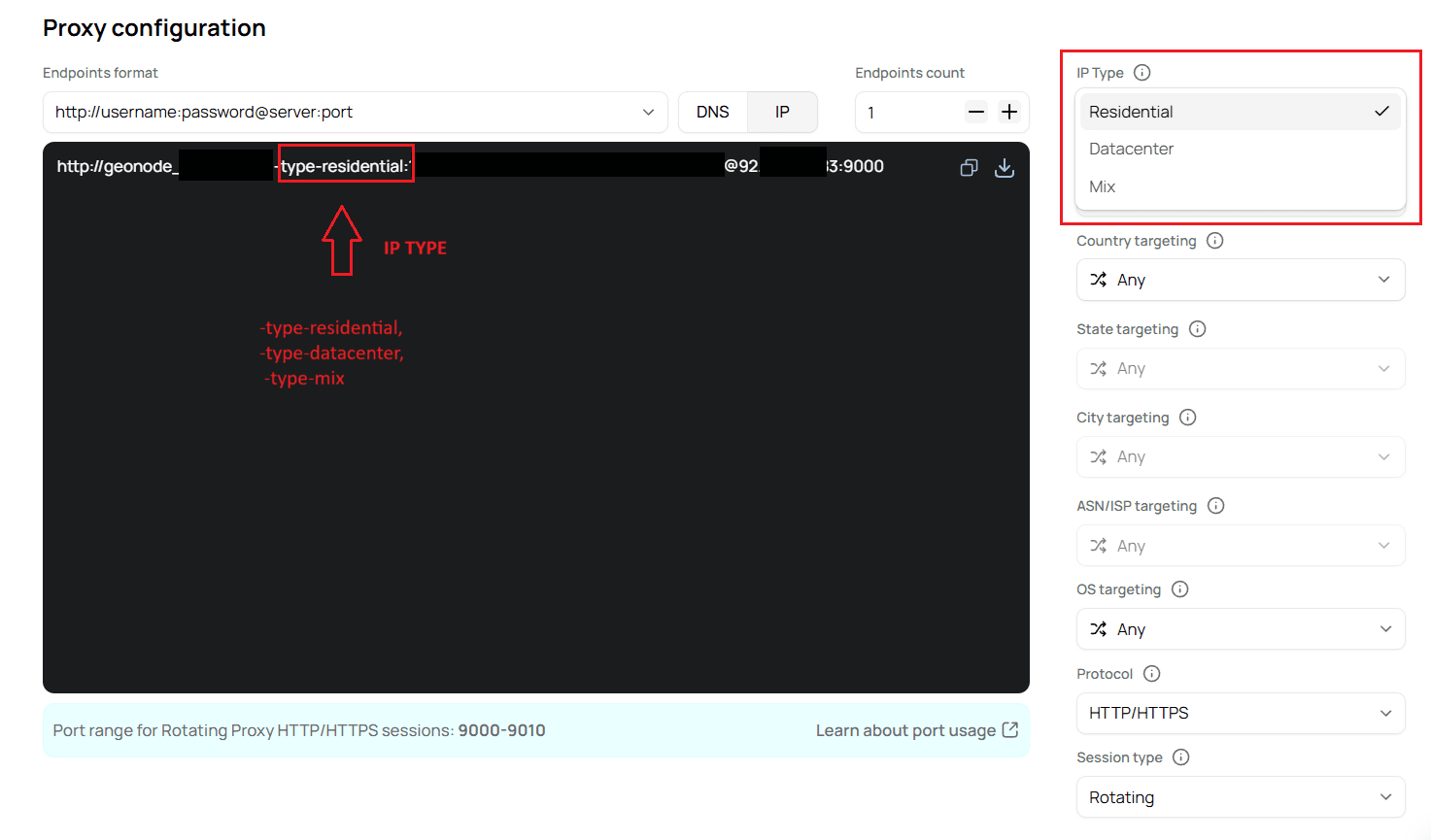
Geonode adds the selected IP type to your generated proxy username.
| IP Type | Username Parameter |
|---|---|
| Residential | -type-residential |
| Datacenter | -type-datacenter |
| Mix | -type-mix |
Test Your IP Type
Use cURL to verify your connection with each IP type. Replace the placeholders with your proxy credentials and use the endpoint shown in your dashboard.
Residential
curl -x 92.204.171.83:9000 \
  -U "YOUR_PROXY_USERNAME-type-residential:YOUR_PROXY_PASSWORD" \
  http://ip-api.com
Datacenter
curl -x 92.204.171.83:9000 \
  -U "YOUR_PROXY_USERNAME-type-datacenter:YOUR_PROXY_PASSWORD" \
  http://ip-api.com
Mix
curl -x 92.204.171.83:9000 \
  -U "YOUR_PROXY_USERNAME-type-mix:YOUR_PROXY_PASSWORD" \
  http://ip-api.com
Test Results
All three requests returned successful responses from ip-api.com.
| Field | Residential | Datacenter | Mix |
|---|---|---|---|
| Status | success | success | success |
| Country | Singapore | United States | Russia |
| City | Singapore | Chicago | St Petersburg |
| ISP | Myrepublic Limited | Verizon Business | Global Network Management Inc |
Exit IP (query) | 103.11.48.148 | 75.210.255.135 | 92.62.60.127 |
| ASN | AS56300 | AS6167 | AS42065 |
The query field identifies the public exit IP detected by the destination service. Your returned IP, location, and ISP may differ between requests.
IP Classification
IP lookup services use their own classification databases. Their classifications may differ from the IP type selected in Geonode.
Frequently Asked Questions
Was this page helpful?