Proxy Protocol
ProxiesThis guide explains how to configure HTTP/HTTPS or SOCKS5 protocols in Geonode and test your proxy connection.
When to Use Each Protocol
Geonode supports two protocol options:
| Protocol | When to Use |
|---|---|
| HTTP/HTTPS | For web requests, scraping, and applications using HTTP-based proxy connections |
| SOCKS5 | For applications requiring SOCKS5 proxy connections or support for different types of traffic |
For a detailed explanation of both protocols, see the Protocol Knowledge Base.
Availability
Protocol selection is available for all three Geonode proxy products:
- Residential Proxies
- Rotating Datacenter Proxies
- Unlimited Residential Proxies
Available hostnames and ports may differ depending on the proxy product.
How to Configure Your Protocol
Open your Geonode Dashboard and select your proxy product.
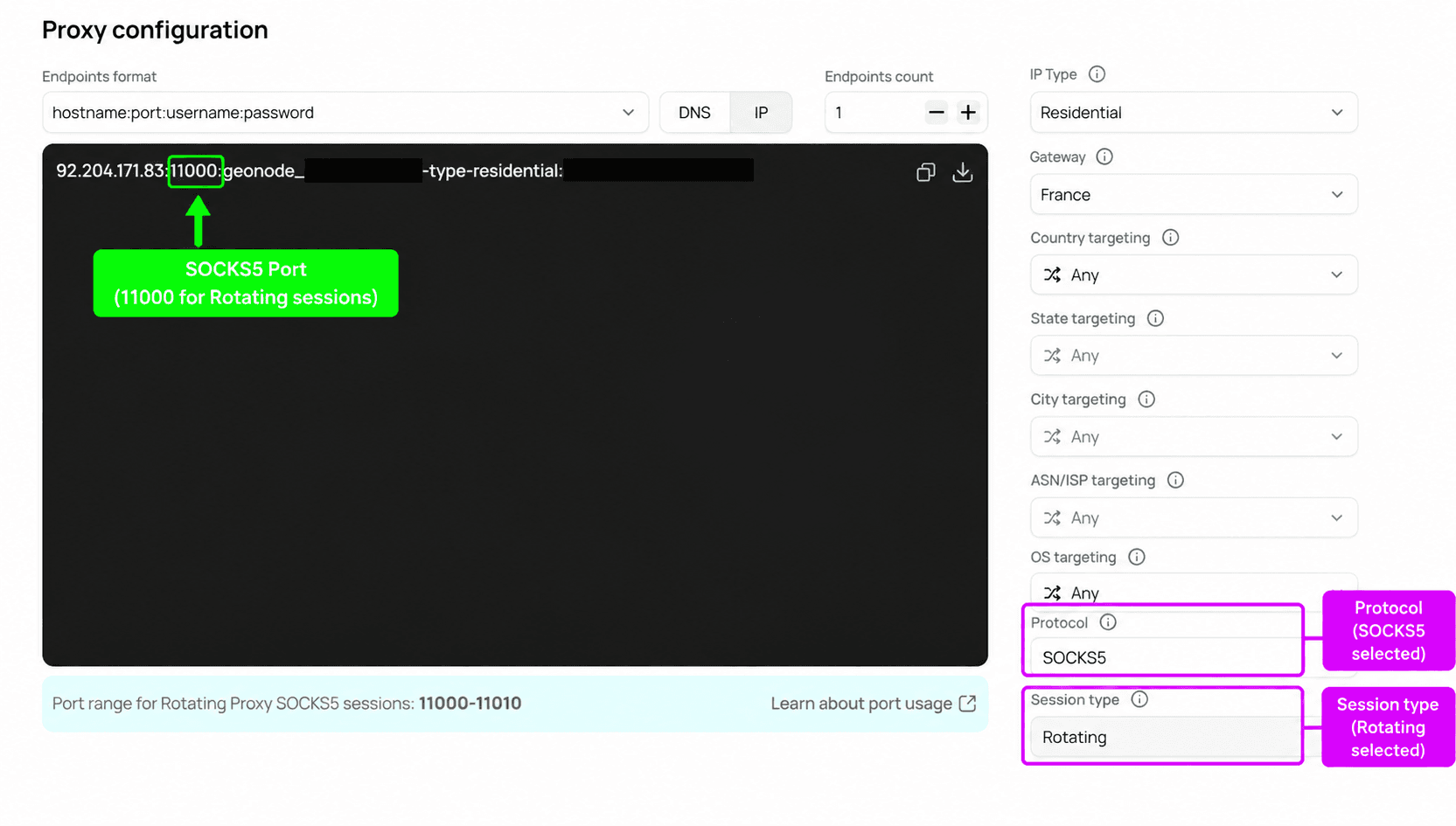
Find Protocol under Proxy configuration.
Select HTTP/HTTPS or SOCKS5.
Choose your Session type, either Rotating or Sticky.
Copy the updated proxy endpoint with the generated port.
Proxy Port Ranges
Geonode uses different port ranges depending on the selected protocol and session type.
| Protocol | Session Type | Port Range |
|---|---|---|
| HTTP/HTTPS | Rotating | 9000-9010 |
| HTTP/HTTPS | Sticky | 10000-10900 |
| SOCKS5 | Rotating | 11000-11010 |
| SOCKS5 | Sticky | 12000-12010 |
The dashboard updates the generated endpoint when you change the protocol or session type.
Port Selection
These port ranges apply to the proxy configuration shown for Residential Proxies. Other proxy products may use different hostnames or ports. Always use the endpoint generated in your dashboard.
Test Your Proxy Protocol
Use cURL to verify your SOCKS5 connection.
Request
The following request uses SOCKS5 with a Residential proxy and a rotating session.
curl -x "socks5://YOUR_PROXY_USERNAME-type-residential:YOUR_PROXY_PASSWORD@92.204.171.83:11000" \
  http://ip-api.com
Replace the placeholder credentials with your Geonode credentials. Use the hostname or IP address and port generated in your dashboard.
Response
The tested request returned:
{
  "status": "success",
  "continent": "North America",
  "continentCode": "NA",
  "country": "United States",
  "countryCode": "US",
  "region": "TX",
  "regionName": "Texas",
  "city": "McAllen",
  "district": "",
  "zip": "78501",
  "lat": 26.2148,
  "lon": -98.231,
  "timezone": "America/Chicago",
  "offset": -18000,
  "currency": "USD",
  "isp": "Spectrum",
  "org": "Road Runner",
  "as": "AS11427 Charter Communications Inc",
  "asname": "TWC-11427-TEXAS",
  "mobile": false,
  "proxy": false,
  "hosting": false,
  "query": "70.117.90.79"
}
The request successfully connected through SOCKS5 on port 11000 and returned an exit IP associated with McAllen, Texas, United States.
Frequently Asked Questions
Was this page helpful?